Hypercinema Week 06 - AI midterm project WIP
- Oct 15, 2025
- 7 min read
Explanation of the old project I had in mind:
For the midterm project, I decided to revisit an old abandoned short animation project of mine that I’ve been wanting to execute for a long time but couldn’t due to a lack of resources (especially 3D animators and riggers).To overcome these obstacles, I decided to keep the project very simple and experimental — using Maya viewport renders to optimize render speed at the expense of detailed graphics and lighting — and then adding watercolor effects and grunge layers to make it feel handmade (without completely hiding the digital aspect).
Here is one example of a style frame test I created for the old movie I was planning:

The movie was supposed to depict (and still does) a sci-fi–fantasy post-apocalyptic world (on the more comic side), where the working class is exiled to the sewers and evolves back into animal-like creatures, while the upper class extends its life by becoming cyborgs and finding exclusive refuge in a city in the sky.
The last picture depicts the cave-like underworld where the sewer people reside.
Aesthetically, I imagined a combination of Yellow Submarine (https://www.pinterest.com/pin/5770305761108698/) and the art of Raman Djafari (https://www.instagram.com/ramandjafari/) and Borislav Kechashki (https://www.instagram.com/bob_kechashki/).
A full animatic and storyboard were also made for the short movie and will be shown later in the blog in comparison with the AI-generated frames. They will also demonstrate the different pipeline/workflow methods I experienced while working with AI on such a project.
Here are the character sketches I made for the sewer creatures, who still maintain the habit of occasionally wearing socks and hats:


And this is the design for the cyborg people:

After completing the pre-production stage, I could easily start the production stage, this time with AI. My suspicion toward this new, rapidly evolving tool quickly turned into excitement after creating the first character in ChatGPT.
To achieve the textures and shading, I reused another old abandoned project of mine, an indie game made with flat low-poly characters with clay material. I was also combining it with the aesthetics of the pencil sketch itself to convey an organic handmade feeling.
Some of the characters made for the game:

The material for the characters made in Substance Painter:

So the prompt to ChatGPT went something like this: “Skin the clay material in the picture onto the character in the sketch.”
This was the result:

I was amazed by several things:
How loyal it stayed to the original style
How quickly it was generated - in just a few seconds. It would normally take an experienced 3D artist at least a few days to create the orthographic design, model, shading, texture, and lighting for this character - not to mention rigging and animation, which are major time consumers.
At this point, I really started to have fun. But before that, I had a less successful experience with Midjourney, which made me stick more to ChatGPT and Gemini:
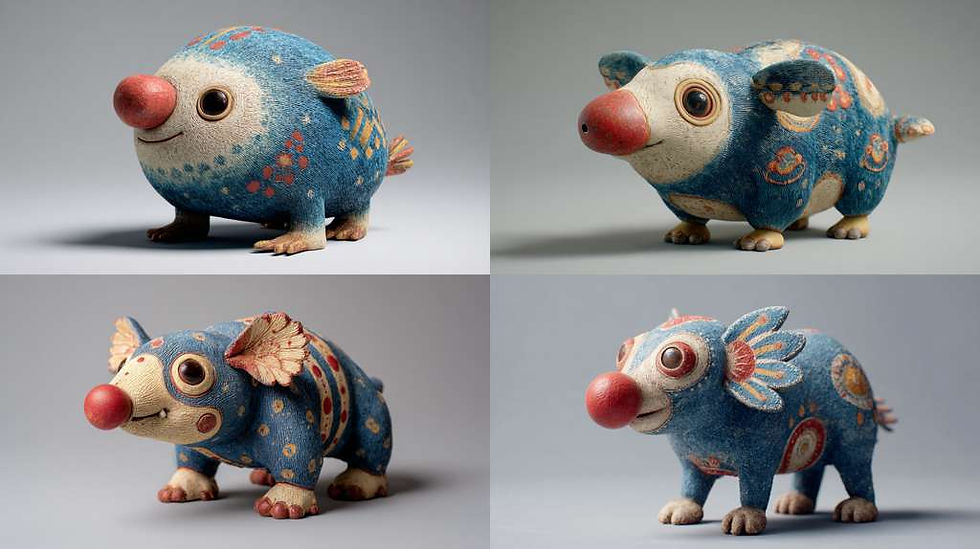
While technically impressive, that wasn’t the style I was looking for at all. Midjourney allowed itself too much creative freedom and was very hard to restrain it. it felt like it couldn’t help itself from creating something overly wholesome and clean.
Later on, I created the rest of the characters with ChatGPT, and everything went more or less smoothly:


Then I wanted to place the character inside the environment. This was the result:

It was kind of cool, but it changed the character - so I had to remind it to stay loyal to the original. I also asked it to make the environment more claymation-like.
This was the second try:

I was pretty happy with this one and felt it encapsulated all of the references I was aiming for and the style I had imagined.But after looking at it long enough, I noticed something was missing - the sewage tunnel!
I then told the chat to add a tunnel and make it look like sewage:

The result was too far from the original, and the tunnel looked too clean and too centered. I realized I would have to give it the original background again and be more precise about the composition and materials.
So I told myself - why not isolate the original background, add a tunnel, a brick wall, sewage water, and repeat the short process of AI generation?
This was the result:

At this point, I started to understand a few things about the workflow:
There’s much more movement back and forth between pre-production and post-production - in a positive way. It’s so easy to add new elements once the AI learns the style you’re aiming for. If I had to redesign the style frames with the sewage tunnels in 3D, it would have taken dozens of hours.
AI performs better when I separate elements like backgrounds, props, and characters, allowing me to gain more control and gradually build up the scene.
A more negative aspect: AI is fed with so much information that it can’t read my mind. Sometimes I have to go back and rearrange compositions and styles. But unlike a traditional animation project, I have the time-management privilege to do so as well as the opportunity to reuse generated fragments of frames that I like, plant them into other scenes, or create new ones from generated material that has already learned my style.
Obviously, I was going to tell ChatGPT to bring it back to claymation 3D, since that’s the vision here:

I didn’t plan this composition, but I liked it for most parts.
The next step was testing animations. This scene was animated in Sora (only a few were), and generally, I wouldn’t recommend it - It didn't do well with character animation and consistency. This specific one turned out perfect for the project so I kept it.
It wasn't even in the original storyboard but I liked it so much that I didn't change a thing. on the contrary - it was one of the few happy accidents I had where AI inspired me to change the pre production stage.
along the way there were also failed attempts - here are few that were too childish or to realistic/ ugly:


And so I repeated this process over and over again on multiple frames, mostly keeping the original idea of the storyboard but incorporating happy accidents provided by AI if they contributed to the storytelling.
I also learned that sometimes I will have to compromise - if a scene is almost where I want it to be after 15 renders and different prompts in Runway, I will take what AI gives me and try to manipulate it with compositing in AE reverse the speed in premiere or see if I can make sense of it in the editing.
here is an example of a storyboard frame next to AI output:


Somehow this frame was hard to execute. The AI platforms didn't change the characters in the way I wanted. I had to take it to photoshop and use the liquify tool aggressively:

later on I have had a failed attempts using Meerkats video as a reference for the animation. and eventually I only used a prompt. for some reason the characters kept diving downwards in the frame with their eyes doing weird movements, talking to themselves, sometimes transforming to different creatures (the negative prompt clearly told them to avoid that):
Finally I had one I could work with
In the final version in premiere I flipped the speed to negative so it starts as if they are eating and then get distracted by something which made sense according to the storyboard. originally they weren't eating but I thought it was a good storytelling addition so I embraced it.
editing was a crucial way for me to maintain storytelling (and to make mor sense out of the AI ouputs).
one of the examples is the glitches at the end of my current final output (which is available in the end of this week's blog).
when asking for a scene with a glitch the timing wasn't right and even though the effect was aesthetically pleasing something felt off.
I later rendered one version with the glitch and one without it and edited it on premiere so each time the tongue licks the crystal we here a distorted digital noise.

Another problem I tackled was handling content the AI platform may interpret as a violation of the user terms and conditions. "licking the crystal" was a prompt that Runway did not like and eventually warned me I'm going to be banned from the app if I try it one more time. so I had to find different ways to fool it. I tried to explain that my intentions are not offensive but AI is very puritan. I wonder what would we feel if photoshop refused to provide us its services for graphic content while we are retouching an artistic photograph. I felt it's a very limiting experience for an artist, and it's interesting to see if we are going to become more conservative in that sense as a society, as a side effect of AI usage.
Lastly I wanted to mention the audio aspect. All of the sounds are from the BBC archive which I found super helpful.
I used multiple layers of cave noises, water flowing, pumps and sewage licks to create the atmosphere. The characters sounds are mostly dogs and wolfs. some are lions snarls, and badgers grooming themselves.
one thing I haven't mentioned is that I also reduced the speed of most outputs to create a stop motion like animation since Runway claimed it cannot generate an animation on twos.
______________________________________________________
I have Hundreds of screenshots and dozens of funny AI videos but it will take forever to post.
Here is a funny one I found to show some of the trial and error process:
And here is the final output of this week which is about half of the full film I hope to finish by the end of the semester.


